Making sure the format of the date you are attempting to enter matches the format of the date column in the database in SQL Server is the most challenging aspect of working with SQL Date. Your queries will function as intended as long as your data just includes the date section. However, it becomes more complex with SQL if there is a time component.
Based on a 24-hour clock, the SQL Date defines a date together with a time of day in fractional seconds.
SQL Date data types
SQL Server - SQL Server comes with the following data types for storing a date or a date/time value in the database
DATE - format YYYY-MM-DD
DATETIME - format: YYYY-MM-DD HH:MI:SS
SMALLDATETIME - format: YYYY-MM-DD HH:MI:SS
TIMESTAMP - format: a unique number
The date types are chosen for a column when you create a new table in your database
Working with Dates in SQL
You can compare two dates easily if there is no time component involved
We have the following OrderDetails table
Syntax
Select * from OrderDetails
Example
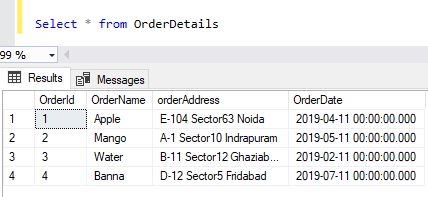
Now we want to select the records with an OrderDate of 2019-04-11 from the table above
We use the following Select statement
Syntax
SELECT FROM OrderDetails WHERE OrderDate='2019-04-11'
Example
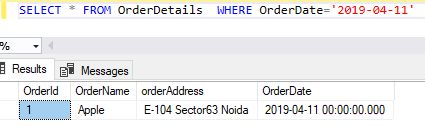
Now we want to select the records with an OrderDate of 2019-04-11 from the table above
We use the following Select statement
Syntax
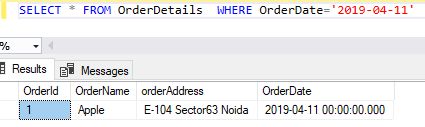
SELECT FROM OrderDetails WHERE OrderDate='2019-04-11'
Example
Converting date and time data in SQL
Converting date and time data is when you convert to date and time data types, SQL server rejects all values.
It doesn't recognize as dates or times for information about using the cast and convert functions with date and time data, see cast and convert in SQL.
Converting date to other date and time types
This section describes what occurs when you convert a date data type to other date and time data types.
When the conversion is to time(n), the conversion fails, and error message 206 is raised and there is an operand type clash: date is incompatible with time.
If the conversion is to datetime, date is copied. The following code shows the results of converting a date value to a datetime value
Syntax
DECLARE @date date = '12-21-16';
DECLARE @datetime datetime = @date;
SELECT @datetime AS '@datetime', @date AS '@date';
Example
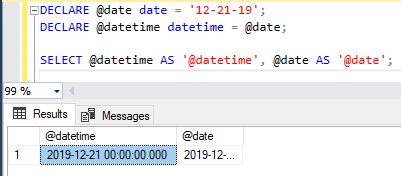
The datetime is define when the conversion is from time(n),the time component is copied, and the date component is set to '1900-01-01'.
When the fractional precision of the time(n) value is greater than three digits, the value will be truncated to fit.
The following example shows the results of converting a time(4)value to a datetime value.
Syntax
DECLARE @time time(4) = '12:10:05.1237';
DECLARE @datetime datetime = @time;
SELECT @datetime AS '@datetime', @time AS '@time';
Example
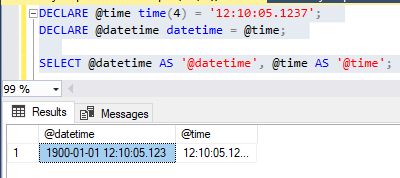
The SQL date time conversion is from smalldatetime the hours and minutes are copied. The seconds and fractional seconds are set to 0.
The following code shows the results of converting a smalldatetime value.
Syntax
DECLARE @smalldatetime smalldatetime = '12-01-19 12:32';
DECLARE @datetime datetime = @smalldatetime;
SELECT @datetime AS '@datetime', @smalldatetime AS '@smalldatetime';
Example
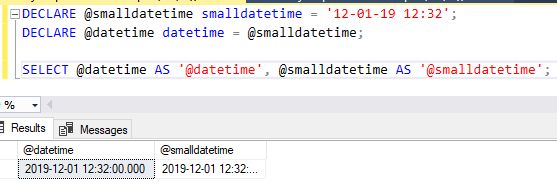
The SQL date time is defined as when the conversion is from datetimeoffset(n)the date and time components are copied. The time zone is truncated. When the fractional precision of the datetimeoffset(n)value is greater than three digits, the value will be truncated. The following example shows the results of converting a datetimeoffset(4) value to a datetime value.
Syntax
DECLARE @datetimeoffset datetimeoffset(4) = '1968-10-23 12:45:37.1234 +10:0';
DECLARE @datetime datetime = @datetimeoffset;
SELECT @datetime AS '@datetime', @datetimeoffset AS '@datetimeoffset';
Example
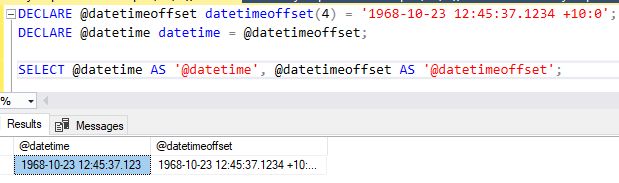
The Datetime is defined as when the conversion is from <datetime2(n),the date="" and="" time="" are="" copied.="" when="" the="" fractional="" precision="" of="" the datetime2(n)<="" b=""> value is greater than three digits, the value will be truncated. </datetime2(n),the>
The Datetime is defined as when the conversion is from datetime2(n), the date and time are copied.
When the fractional precision of the datetime2(n) value is greater than three digits, the value will be truncated.
The following example shows the results of converting a datetime2(4)value to a datetimevalue.
The following example shows datetime and datetime2 in SQL server
Syntax
DECLARE @datetime2 datetime2(4) = '1968-10-23 12:45:37.1237';
DECLARE @datetime datetime = @datetime2;
SELECT @datetime AS '@datetime', @datetime2 AS '@datetime2';
Example
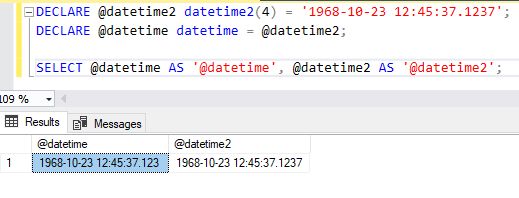
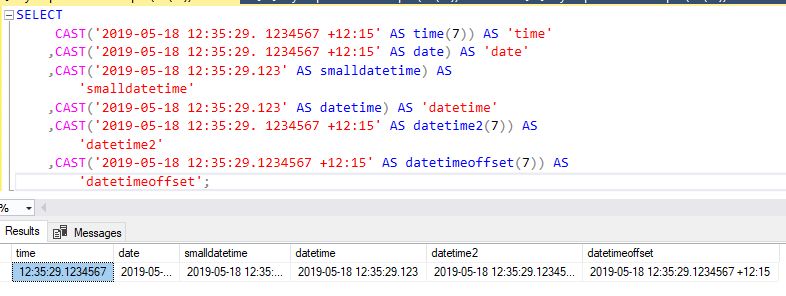
The following example compares the results of casting a string to each date and data type.
Syntax
SELECT
CAST'2019-05-18 12:35:29. 1234567 +12:15' AS "keyword">time(7)) AS 'time'
,CAST'2019-05-18 12:35:29. 1234567 +12:15' AS date AS 'date'
,CAST('2019-05-18 12:35:29.123' >AS smalldatetime) AS
'smalldatetime'
,CAST'2019-05-18 12:35:29.123' AS datetime) >AS 'datetime'
,CAST('2019-05-18 12:35:29. 1234567 +12:15' >AS datetime2(7)) AS
'datetime2'
,CAST'2019-05-18 12:35:29.1234567 +12:15' AS datetimeoffset(7)) AS
'datetimeoffset';
Example
Summary
In this article, you learned how to use SQL Date and Time Data with various options.
HostForLIFE.eu SQL Server 2022 Hosting
HostForLIFE.eu is European Windows Hosting Provider which focuses on Windows Platform only. We deliver on-demand hosting solutions including Shared hosting, Reseller Hosting, Cloud Hosting, Dedicated Servers, and IT as a Service for companies of all sizes.
