European Windows 2012 Hosting BLOG

BLOG about Windows 2012 Hosting and SQL 2012 Hosting - Dedicated to European Windows Hosting Customer

SQL Server Hosting - HostForLIFE :: Check the Disk Space Usage of Each Table in the SQL Server Database

clock September 24, 2024 08:36 by author Peter


I will show you how to check disk space utilization in SQL Server in this article, with a particular emphasis on how to find the disk space consumed by different tables. Database administrators must keep an eye on disk space use to guarantee optimal database performance and prevent storage-related problems. Through this approach, you will be able to better plan, optimize, and manage your storage resources by knowing how much disk space each table takes up.

How Can I Check How Much Disk Space Each Table Is Using?
A SQL Server database can be checked for disk space use by table using one of two approaches.

Integrated function located in Reports (SQL Server Management Studio)
We will go over "Disk Usage By Table" in this section, but first, let's take a step-by-step look at the built-in function under reports (the report menu has a lot of reports that we may see). I've downloaded the "NorthWind" database in order to provide an example of disk utilization by table.

The total amount of space allotted to each table in the list will be shown in the report. The "Orders" table takes up the most room in the example below, followed by the "OrderDetails" table, the "Employees" table, and so on.

Using SQL Stored Procedure/Query
If you want to calculate disk space utilization by tables in an SQL Server database using a stored procedure and customize your report, you can do so with a stored procedure. I’ve created one to calculate disk space utilization by tables. Please see the stored procedure below.
CREATE PROCEDURE USP_GetDiskSpaceUsedByTables
AS
BEGIN
    SELECT
        t.name AS TableName,
        s.name AS SchemaName,
        p.rows,
        SUM(a.total_pages) * 8 AS TotalReservedSpaceKB,
        SUM(a.used_pages) * 8 AS UsedSpaceKB,
        (SUM(a.total_pages) - SUM(a.used_pages)) * 8 AS UnusedSpaceKB,
        CAST(ROUND(((SUM(a.total_pages) * 8) / 1024.00), 2) AS NUMERIC(36, 2)) AS TotalReservedSpaceMB,
        CAST(ROUND(((SUM(a.used_pages) * 8) / 1024.00), 2) AS NUMERIC(36, 2)) AS UsedSpaceMB,
        CAST(ROUND(((SUM(a.total_pages) - SUM(a.used_pages)) * 8) / 1024.00, 2) AS NUMERIC(36, 2)) AS UnusedSpaceMB
    FROM
        sys.tables t
    INNER JOIN
        sys.indexes i ON t.object_id = i.object_id
    INNER JOIN
        sys.partitions p ON i.object_id = p.object_id AND i.index_id = p.index_id
    INNER JOIN
        sys.allocation_units a ON p.partition_id = a.container_id
    LEFT OUTER JOIN
        sys.schemas s ON t.schema_id = s.schema_id
    WHERE
        t.name NOT LIKE 'dt%'
        AND t.is_ms_shipped = 0
        AND i.object_id > 255
    GROUP BY
        t.name, s.name, p.rows
    ORDER BY
        TotalReservedSpaceMB DESC, t.name
END


Let's execute this stored procedure and review the results, which are calculated in the same way as the built-in SQL report functionality.

Why Check Disk Space Utilization by Tables in a SQL Server Database?
Here are the key reasons to check disk space utilization by tables in an SQL Server database.

  • Performance optimization
  • Data management
  • Cost management
  • Compliance and auditing
  • Resource allocation
  • Data Archiving
  • Post index maintenance

Summary
I've covered efficient ways to keep an eye on and control disk space usage in your SQL Server database in this post. I specifically walk through two methods for monitoring disk space usage at the table level. By employing these techniques, you can obtain important knowledge about how much storage is being used by your database, which will enable you to better effectively schedule your tasks. In your database environment, this proactive management may result in better resource allocation and performance.

Happy reading!

HostForLIFE.eu SQL Server 2022 Hosting
HostForLIFE.eu is European Windows Hosting Provider which focuses on Windows Platform only. We deliver on-demand hosting solutions including Shared hosting, Reseller Hosting, Cloud Hosting, Dedicated Servers, and IT as a Service for companies of all sizes.


SQL Server Hosting - HostForLIFE :: A Solution for the Login Failed SQL Server Error 18456

clock September 19, 2024 07:33 by author Peter

We will talk about a common problem that arises when we try to install SQL Server 2019 Developer Edition in custom mode in this article. SQL Server is typically installed by default and functions perfectly. Occasionally, nevertheless, we may run into some issues when installing the latest version. Upon installing the SQL Server Developer Edition 2019, I encountered a problem that appears to be related to a PolyBase issue.

Issue
When attempting to log in to SQL Server, an error 18456 was encountered.

Reason
Microsoft SQL Server, Error 18456 is the most common error in SQL server login. There are multiple reasons for this error. At least, we can divide them as two types, the error come from

  • SQL Server authentication mode
  • Windows Authentication Mode

SQL Server authentication mode
"Login failed for user'sa'. (Microsoft SQL Server, Error 18456)" refers to a specific user's login using the SQL Server authentication mode in the first two situations of our demo. One possible explanation for this scenario is that the SQL server instance is set up for Windows Authentication mode, but you are attempting to use SQL Server Authentication. This is the result of installing SQL Server Basic Mode, which is limited to operating in Windows Authentication mode and not in SQL Server Authentication mode by default.We must change the Windows Authentication Mode to the Mixed Mode in this situation.

The fix for this, I have discussed in my SQL Server installation article SQL Server Installation: 2022 Developer Edition --- Basic, or you may see [ref1], [ref2].

SQL Server authentication mode
For this, the main reason is due to the ID is not in the login list of the Server. We can get the login list by Click Login, under the security folder of the given database:


This can be obtain by SQL Command:
exec master.dbo.xp_logininfo

In different SQL Server:

We can get only one specific group with given parameter:
exec master.dbo.xp_logininfo 'NT SERVICE\Winmgmt'

Get the group members by the optional second parameter 'members':

Fix
If we have the person's ID, or the group name, then we can add it into the login list:

The name must be a valid user ID or AD group name:

Server role: by default --- public

OK

 Choose the specific data tables, and give the appreciate rights => OK

OK => Done

Summary

This login failed with SQL Server authentication is mainly due to lack of the individual ID or group the ID is belong to. Find out it and add it. The error is fixed.

HostForLIFE.eu SQL Server 2022 Hosting
HostForLIFE.eu is European Windows Hosting Provider which focuses on Windows Platform only. We deliver on-demand hosting solutions including Shared hosting, Reseller Hosting, Cloud Hosting, Dedicated Servers, and IT as a Service for companies of all sizes.


SQL Server Hosting - HostForLIFE :: The Upcoming SQL Server Version Has Seven Exciting Features

clock August 22, 2024 09:08 by author Peter

There is much to look forward to as we eagerly await the introduction of the next edition of SQL Server, which is scheduled for about 2025. Microsoft has been making references to a number of intriguing new features and enhancements that should boost our analytics and database management skills. This is a preview of what's to come:

1. Improved Data Analysis
The enhanced connectivity with Azure Synapse Analytics is one of the most eagerly awaited improvements. This will allow for almost real-time analytics on operational data, which will facilitate the acquisition of knowledge and speedy decision-making based on data.

2. Integration of Object Storage

S3-compatible object storage is anticipated to be supported by the upcoming release. Better data virtualization and direct T-SQL query support for parquet files translate to more opportunities for data management and analysis.

3. Enhanced Accessibility
Features like contained availability groups and disaster recovery replication to an Azure SQL Managed instance are to be expected. More reliable alternatives for preserving high availability and guaranteeing business continuity will be made available by these improvements.

4. Machine Learning and AI

Given AI's increasing significance, improved AI-related functionality will probably be included in the upcoming SQL Server version. In order to improve performance and facilitate the integration of Machine Learning models into your data operations, this may include utilizing GPUs.

5. Enhancements in Performance
As always, performance is the main priority, and the next version is no different. Keep an eye out for improvements to the Maximum Degree of Parallelism (MaxDOP) for query execution and optimizations related to cardinality estimates. These adjustments should lead to faster and more effective searches.

6. Improvements to Security

Security is still of the utmost importance, and the new version will include capabilities to support compliance objectives and data protection. These improvements will guarantee the security of your data and make it easier for you to comply with regulatory standards.

7. Support for Regular Expressions
Lastly, support for regular expressions is one of the most desired features. This will significantly improve the text data manipulation capabilities of SQL Server, facilitating the execution of intricate text searches and transformations.

With these additions, SQL Server's upcoming release should become a very useful tool for developers and data specialists. As the release date approaches, be sure to check back for additional updates!

HostForLIFE.eu SQL Server 2022 Hosting
HostForLIFE.eu is European Windows Hosting Provider which focuses on Windows Platform only. We deliver on-demand hosting solutions including Shared hosting, Reseller Hosting, Cloud Hosting, Dedicated Servers, and IT as a Service for companies of all sizes.


SQL Server Hosting - HostForLIFE :: SQL Database Backup and Restore Procedure

clock June 21, 2024 07:32 by author Peter

Maintaining data availability and integrity is essential to database administration. Preventing data loss requires regularly backing up your database, and understanding how to restore it is crucial for disaster recovery. The procedures for backing up and restoring a SQL database are covered in this article, along with practical examples for common SQL Server setups.

Database Backup's Significance

When you back up your database, you make a backup of your data that you can restore in the event of a software malfunction, hardware failure, or unintentional data loss. Maintaining data consistency and integrity is aided by routine backups.

Backup a SQL Database
Here's how to back up a database in SQL Server.
Using SQL Server Management Studio (SSMS)

  • Open SSMS: Connect to your SQL Server instance.
  • Select the Database: In the Object Explorer, expand the databases folder, right-click the database you want to back up (e.g., SalesDB), and select Tasks > Back Up.
  • Backup Options: In the Backup Database window, specify the following.
  1. Backup Type: Choose Full (a complete backup of the entire database).
  2. Destination: Add a destination for the backup file (usually a .bak file).
  • Execute Backup: Click OK to start the backup process.

Example. Suppose we have a database named SalesDB. The steps would be

  • Right-click SalesDB in Object Explorer.
  • Select Tasks > Back Up.
  • Set the Backup Type to Full.
  • Choose the destination path, e.g., C:\Backups\SalesDB.bak.
  • Click OK to initiate the backup.

Using T-SQL
You can also use a T-SQL script to back up your database.
BACKUP DATABASE SalesDB
TO DISK = 'C:\Backups\SalesDB.bak'
WITH FORMAT,
     MEDIANAME = 'SQLServerBackups',
     NAME = 'Full Backup of SalesDB';


This script creates a full backup of SalesDB and saves it to the specified path.

Restore a SQL Database

Restoring a database involves copying the data from the backup file back into the SQL Server environment.

  • Using SQL Server Management Studio (SSMS)
  • Open SSMS: Connect to your SQL Server instance.
  • Restore Database: Right-click the Databases folder and select Restore Database.
  • Specify Source: In the Restore Database window, choose the source of the backup:
  1. Device: Select the backup file location.
  2. Database: Choose the database name to restore.
  • Restore Options: In the Options page, you can choose to overwrite the existing database and set recovery options.
  • Execute Restore: Click OK to start the restoration process.

Example. Suppose we want to restore SalesDB from a backup.

  • Right-click Databases in Object Explorer and select Restore Database.
  • Under Source, choose Device and select C:\Backups\SalesDB.bak.
  • Under Destination, ensure SalesDB is selected.
  • In Options, check Overwrite the existing database.
  • Click OK to initiate the restore.

Using T-SQL
You can also use a T-SQL script to restore your database:
RESTORE DATABASE SalesDB
FROM DISK = 'C:\Backups\SalesDB.bak'
WITH REPLACE,
     MOVE 'SalesDB_Data' TO 'C:\SQLData\SalesDB.mdf',
     MOVE 'SalesDB_Log' TO 'C:\SQLData\SalesDB.ldf';


This script restores SalesDB from the specified backup file, replacing the existing database, and moves the data and log files to specified locations.

  • Best Practices for Backup and Restore
  • Regular Backups: Schedule regular backups (daily, weekly) to ensure data is consistently saved.
  • Multiple Backup Types: Utilize different backup types (full, differential, and transaction log backups) to balance between backup size and restore time.
  • Offsite Storage: Store backups in different physical locations or cloud storage to protect against site-specific disasters.
  • Testing: Regularly test your backups by performing restore operations to ensure they are functional and data is intact.
  • Security: Encrypt backups and use secure storage locations to prevent unauthorized access.

Conclusion
One of the most important aspects of database administration is backing up and restoring SQL databases. Knowing how to use T-SQL scripts or SQL Server Management Studio (SSMS) will guarantee data availability and integrity. It is possible to protect your data from loss and guarantee prompt recovery when necessary if you adhere to recommended practices for backups and routinely test your restore operations.

HostForLIFE.eu SQL Server 2022 Hosting
HostForLIFE.eu is European Windows Hosting Provider which focuses on Windows Platform only. We deliver on-demand hosting solutions including Shared hosting, Reseller Hosting, Cloud Hosting, Dedicated Servers, and IT as a Service for companies of all sizes.


SQL Server Hosting - HostForLIFE :: Executing Dynamic SQL in SQL Server

clock June 10, 2024 08:37 by author Peter

You can create and run SQL statements dynamically at runtime with SQL Server's sophisticated dynamic SQL functionality. When you need to create sophisticated queries based on changing inputs or circumstances, this feature can be very helpful. It does, however, also have a unique set of difficulties and dangers. The goal of this essay is to give readers a thorough grasp of dynamic SQL, including its multiple execution techniques and recommended usage guidelines. We'll also go over when dynamic SQL is appropriate and when it should be avoided in certain instances.

What is Dynamic SQL?
Dynamic SQL refers to SQL code that is generated and executed at runtime rather than being hard-coded in the application. This approach allows for greater flexibility, as the SQL statements can be tailored based on user input, application state, or other runtime conditions. Dynamic SQL is constructed as a string and then executed by the SQL Server.

Methods of Executing Dynamic SQL
There are two ways to execute dynamic SQL in SQL Server, each with its own advantages and considerations. The primary methods are.
EXECUTE (EXEC)
sp_executesql


EXECUTE (EXEC)
The EXECUTE (or EXEC) statement is a straightforward way to execute dynamic SQL. It is simple and easy to use but has certain limitations.
In the below example, the EXEC statement executes the dynamic SQL string stored in the @SQL variable.

Advantages
Simple to use.

  • Suitable for straightforward dynamic SQL statements.

Limitations
Limited parameterization can lead to SQL injection vulnerabilities.
Harder to debug and maintain for complex queries.

sp_executesql
The sp_executesql stored procedure is a more robust and secure way to execute dynamic SQL. It allows for parameterized queries, which enhances security and performance.

In the below example, sp_executesql executes a parameterized dynamic SQL statement, providing better security and performance.
--Syntax
sp_executesql
    [ @stmt = ] statement
    [ , { [ @params = ] N'@parameter_name data_type [ ,...n ]' } ]
    [ , { [ @param1 = ] 'value1' [ ,...n ] } ]
DECLARE @SQL NVARCHAR(MAX);
DECLARE @DepartmentID INT = 1;
SET @SQL = N'SELECT * FROM Employees WHERE DepartmentID = @DeptID';
EXEC sp_executesql @SQL, N'@DeptID INT', @DeptID = @DepartmentID;


Advantages

  • Supports parameterization, reducing the risk of SQL injection.
  • Allows for better query plan reuse, improving performance.
  • More readable and maintainable for complex queries.

Limitations

  • Slightly more complex to use than EXEC.
  • Requires careful handling of parameter data types and lengths.


When to Use Dynamic SQL?

Dynamic SQL is particularly useful in the following scenarios.
Dynamic Table Names or Column Names: When the table name or column names need to be decided at runtime.

DECLARE @TableName NVARCHAR(100) = 'Employees';
DECLARE @SQL NVARCHAR(MAX);
SET @SQL = N'SELECT * FROM ' + QUOTENAME(@TableName);
EXEC sp_executesql @SQL;


Complex Search Conditions: When the search conditions are not known until runtime and can vary significantly.
DECLARE @SQL NVARCHAR(MAX);
DECLARE @SearchCondition NVARCHAR(100) = 'Salary > 50000';
SET @SQL = N'SELECT * FROM Employees WHERE ' + @SearchCondition;
EXEC sp_executesql @SQL;

Metadata Queries: When querying system catalog views or system tables where the structure is not known until runtime.
Data-Driven Logic: When business logic depends on data that is not known until runtime.

When Not to Use Dynamic SQL?

Dynamic SQL should be avoided in the following scenarios.

  • Simple Static Queries: When the SQL statements are known and do not change, using static SQL is simpler and more efficient.
  • Security Concerns: If not handled properly, dynamic SQL can lead to SQL injection vulnerabilities.
  • Performance Issues: Excessive use of dynamic SQL can lead to poor performance due to the lack of query plan reuse.
  • Complexity and Maintainability: Dynamic SQL can make the code more complex and harder to maintain.


Best Practices for Using Dynamic SQL
When using dynamic SQL, follow these best practices to ensure security, performance, and maintainability.

  • Always use parameterized queries to prevent SQL injection and improve performance.
  • Use the QUOTENAME function to safely include object names (e.g., table names, column names) in dynamic SQL.
  • Always validate and sanitize input values to prevent SQL injection.
  • Minimize the Use of Dynamic SQL, use dynamic SQL only when necessary. For static or known queries, use regular SQL statements.
  • Monitor the performance of dynamic SQL statements and optimize them as needed. Use tools like SQL Server Profiler or Extended Events to analyze performance.
  • Document and comment on your dynamic SQL code to make it easier to understand and maintain.

Advanced Topics in Dynamic SQL
Handling Output Parameters
Dynamic SQL can also handle output parameters using sp_executesql.In the below example, the sp_executesql procedure is used to execute a dynamic SQL statement with an output parameter.DECLARE @SQL NVARCHAR(MAX);
DECLARE @TotalCount INT;
SET @SQL = N'SELECT @Count = COUNT(*) FROM Employees WHERE DepartmentID = @DeptID';
EXEC sp_executesql @SQL, N'@DeptID INT, @Count INT OUTPUT', @DeptID = 1, @Count = @TotalCount OUTPUT;
PRINT @TotalCount;
Executing Dynamic DDL statementsDynamic SQL can be used to execute dynamic Data Definition Language (DDL) statements, such as creating or altering tables.In the below example, a table is created dynamically using dynamic SQL.DECLARE @SQL NVARCHAR(MAX);
SET @SQL = N'CREATE TABLE DynamicTable (ID INT, Name NVARCHAR(100))';
EXEC sp_executesql @SQL;
Using Dynamic SQL in Stored ProceduresDynamic SQL can be embedded within stored procedures to add flexibility to the procedure logic.In the below example, a stored procedure uses dynamic SQL to retrieve employees based on a department ID.CREATE PROCEDURE GetEmployeesByDepartment
    @DepartmentID INT
AS
BEGIN
    DECLARE @SQL NVARCHAR(MAX);
    SET @SQL = N'SELECT * FROM Employees WHERE DepartmentID = @DeptID';
    EXEC sp_executesql @SQL, N'@DeptID INT', @DeptID = @DepartmentID;
END;


Conclusion
With careful usage and adherence to best practices, dynamic SQL can be an invaluable tool in your SQL Server development toolkit, enabling you to create flexible, efficient, and secure database applications. By following best practices such as using parameterized queries, validating input, and optimizing performance, you can harness the power of dynamic SQL while mitigating its risks. Always consider the specific requirements and constraints of your application to determine when dynamic SQL is appropriate and when static SQL might be a better choice.

HostForLIFE.eu SQL Server 2022 Hosting
HostForLIFE.eu is European Windows Hosting Provider which focuses on Windows Platform only. We deliver on-demand hosting solutions including Shared hosting, Reseller Hosting, Cloud Hosting, Dedicated Servers, and IT as a Service for companies of all sizes.


SQL Server Hosting - HostForLIFE :: Top Techniques for Creating Efficient Databases in SQL Server

clock May 29, 2024 08:22 by author Peter

Regardless of degree of experience, designing scalable and efficient apps requires knowing how to establish a database in SQL Server. Our intention is to provide you practical guidance and industry best practices so that you may build a capable SQL Server database. These tips are meant to help you succeed whether you're creating a brand-new database or enhancing an existing one. In this post, we'll go over crucial recommended practices to ensure the viability and efficiency of your database architecture.

Reasonable Database Design Is Essential
A well-organized library is similar to a well-planned database. It makes information easier to retrieve, saves time, and lessens irritation. A strong database design is also the cornerstone of an application in the field of software development. Everything is affected by the layout of your database, including how fast your queries run and how easily you can make changes. Robust designs enhance performance, offer scalability as your application grows, and make maintenance simpler.

The Best Techniques for Creating Efficient Databases in SQL Server
Now let's examine some best practices for efficient SQL Server database design.

Recognizing Database Needs
Work with stakeholders to understand their needs before getting into the details. What kind of data must they store? What connections are there between various data entities? Consider entities to be the principal characters in your database tale. Describe their relationships with one another and the characteristics that make up each entity. The base of your database structure is this. Expansion is taken into account in well-designed databases. When designing your database, consider how the data may evolve over time and ensure that it can accommodate new information without requiring a total overhaul.

Principles of Normalization
Normalization is analogous to database cleanup. It results in a more streamlined and effective structure by minimizing redundancy and dependence problems. Acquire knowledge of the various normal forms (1NF, 2NF, 3NF, and above) and utilize them accordingly. Every standard form is built upon the one before it, guaranteeing that your data is arranged methodically. Normalization is important, but don't go overboard with it. Achieving the right balance prevents excessive complexity and maintains your database user-friendly.

Choosing Appropriate Data Types
Data types define the kind of information your database can store. Choosing the right ones ensures accuracy and efficiency in data storage. Learn about the variety of data types available in SQL Server. From integers to decimals, each type serves a specific purpose. Understand their characteristics and use them according to your needs. Efficient data storage and retrieval are key. Consider the size of your data and the operations you'll perform to optimize for both storage space and performance.

Indexing Strategies

Like an index in a book, a database's index will quickly lead you to the information you're looking for. They are essential for query performance optimization. Understand the differences between non-clustered and clustered indexes and use each one wisely. The speed of your database can be significantly increased by effective indexing, but following best practices is essential. To ensure you get the most out of index creation and selection, consider things like selectivity and the type of queries you are using. A responsive and effective database can only be achieved with properly implemented indexes.

Effective Use of Constraints

Database constraints are essential because they act as guardians and preserve data integrity. Relationships between data entities are specifically managed by primary and foreign key constraints. By enforcing validation rules through the use of check constraints, inaccurate or inconsistent data cannot be included. When no value is specified, default constraints automatically assign a default value, which simplifies data entry. Understanding when and how to apply these constraints wisely is essential to mastering their effective use and guaranteeing a solid and error-free database structure.

Stored Procedures and Functions
Stored procedures and functions in SQL Server offer advantages in modularity and security, contributing to a more manageable codebase. You can design effective stored procedures that simplify execution by following performance guidelines. It is essential to comprehend parameters and return types so that you can customize these components to meet your unique needs. Your stored procedures' adaptability and usefulness are increased by this customization, which eventually boosts the efficiency and maintainability of your database-driven apps.

Avoiding Common Pitfalls
Remove redundant and duplicate data as soon as possible to guarantee a tidy and effective database. Strike the correct balance when using indexes to avoid performance problems and needless complexity. Prevent slow performance by optimizing queries and joins for a responsive application. When designing, keep the future in mind and account for expansion and change to prevent costly redesigns down the road. You can create a database that is not only up-to-date but also scalable and future-proof by taking these factors into account.

Performance Considerations

Refine your queries for maximum performance and examine execution plans to get the most out of the database. To simplify code, make use of variables and temporary tables. Use monitoring techniques and tools to steadily improve database performance over time. This proactive strategy guarantees optimal system performance, preserving scalability and responsiveness.

Security Best Practices
Limit user access by using the least privilege principle, and safeguard sensitive data through secure network transmission and encryption. Keep up with best practices and conduct regular security audits to protect your database from potential threats. With regular audits and the most recent security patches, this method guarantees that users have access only when required, that data is secure during transmission, and that your database is actively safeguarded.

Documentation and Maintenance
To ensure smooth database management, create detailed documentation for clarity. To maximize database performance, carry out maintenance procedures regularly, such as statistics updates and index rebuilds. To ensure smooth updates and systematic tracking of changes, apply version control to the database schema. Together, these procedures support an effective and well-maintained database system.

Conclusion
To put it briefly, organizing your SQL Server database is similar to organizing your application's library. It facilitates easy access to information, minimizes frustration, and saves time. We've covered important procedures, such as identifying user needs and putting security measures in place.

Keep in mind that a good database changes to meet your needs. For better efficiency, review and optimize frequently and adjust as necessary. By following these guidelines, you can create databases that are reliable, expandable, and simple to manage.

HostForLIFE.eu SQL Server 2022 Hosting
HostForLIFE.eu is European Windows Hosting Provider which focuses on Windows Platform only. We deliver on-demand hosting solutions including Shared hosting, Reseller Hosting, Cloud Hosting, Dedicated Servers, and IT as a Service for companies of all sizes.


SQL Server Hosting - HostForLIFE :: SQL Primary Key: Syntax, Uses, and Illustration

clock May 15, 2024 08:06 by author Peter

A primary key constraint is a key that has one or more columns to help identify each tuple or record in a table individually.

Qualities
Only distinct values should be assigned to the column designated as the primary key; duplicate values are forbidden. The primary key column contains no NULL values. As a result, there is a necessary value in the column holding the primary key. There is only one primary key per table, even if a primary key may contain more than one column.

Adding a new row using an existing primary key is not feasible.

categorized as,

  • A single-column, basic primary key.
  • Multiple columns make up the composite primary key.

As stated in the Make a Table or Modify a table statement.

A PRIMARY KEY constraint can be used to create the primary key in a table.

It can be created at a couple of levels.

  • Column
  • Table

SQL Primary Key at Column level
The primary key should be defined at the column level if it only has one column. The primary key "primary_field_name" is created in the table by the following code.

Syntax

Field_name data_type PRIMARY KEY

Example

CREATE TABLE Employee
(
  Id INT NOT NULL PRIMARY KEY,
  [Name] VARCHAR(50) NOT NULL,
  City VARCHAR(20) NOT NULL
)


Let’s verify the primary key with an example.
INSERT INTO Employee
VALUES (1, 'Peter', 'Scott');

Let’s try the execution of the same query again in SQL.

It will throw an exception.

Let’s try with the NULL inserted as the primary key value.
INSERT INTO Employee
VALUES (NULL , 'Peter', 'Scott');

It will throw an error due to null not being allowed in the primary key.

SQL Primary key at Table level

Whenever the primary key contains more than one column, it has to be specified at the table level.

Syntax
CREATE TABLE table_name
(
  field1 data_type,
  field2 data_type,
  ...
  PRIMARY KEY (field1)
)


Example
CREATE TABLE Employee
(
  Id INT NOT NULL,
  [Name] VARCHAR(50) NOT NULL,
  City VARCHAR(20) NOT NULL,
  PRIMARY KEY (Id)
)


Primary Key with Multiple Columns

If you want to add a primary key to more than one column, then that is not possible at the column level; that is possible at the table level.
CREATE TABLE Employee
(
  Id INT NOT NULL,
  [Name] VARCHAR(50) NOT NULL,
  City VARCHAR(20) NOT NULL,
  PRIMARY KEY (Id, [Name])
)

Primary Key with Alter Table
The primary key is typically defined at the time the table is created, but occasionally it might not be created in the table that already exists. However, we can use the Alter Statement to add the primary key.

For a Single Column

Syntax
ALTER TABLE Table_name
ADD PRIMARY KEY (column1);

Example
ALTER TABLE Employee
ADD PRIMARY KEY (Id);


For Multiple Columns
Syntax
ALTER TABLE Table_name
ADD CONSTRAINT primary_key_name PRIMARY KEY (column1, column2);


Example
ALTER TABLE Employee
ADD CONSTRAINT Employee_PK PRIMARY KEY (Id, [Name]);

Remove Primary Key
We can remove the primary key constraint from a table using the DROP statement.

Syntax
ALTER TABLE table_name
DROP CONSTRAINT primary_key_name;

Example
ALTER TABLE Employee
DROP CONSTRAINT Employee_PK;


We learned the new technique and evolved together.
Happy coding!

HostForLIFE.eu SQL Server 2022 Hosting
HostForLIFE.eu is European Windows Hosting Provider which focuses on Windows Platform only. We deliver on-demand hosting solutions including Shared hosting, Reseller Hosting, Cloud Hosting, Dedicated Servers, and IT as a Service for companies of all sizes.


SQL Server Hosting - HostForLIFE :: Run Multiple SQL Files in a Single SQL Server Execution

clock May 6, 2024 10:05 by author Peter

Do you make use of SQL Server? Do some teams or DBAs still manage deployments by hand? Are project or financial constraints preventing the incorporation of CI/CD tools? However, there's a chance to use more than one SQL script.

Overview
Running SQL scripts is a standard procedure in database management. But handling several SQL files might make the procedure tiresome and time-consuming. Batch scripts are one of the ways that SQL Server offers for executing SQL scripts. We will examine how to effectively use a batch script to run several SQL files in SQL Server in this article.

Understanding Batch Scripting
Batch scripting is a powerful tool for automating tasks in Windows environments. It allows users to execute a series of commands or scripts in a sequential manner. These scripts are saved with a .bat extension and can be run by simply double-clicking them or through the command line.

Pre-requisite for Batch File

    This script deploys all the .sql files present in a directory or sub-directories in an order.
    NO SPACE in .sql file name.
    NO SPACE in sub-directories.
    To execute .sql in order, add a numeric sequence as follows:
    createtable.sql
    insertdata.sql
    execstoredproc....etc.
    Specify the SERVERNAME, which is mandatory.
    DATABASENAME is optional (Commented-out). In case enabling add (-d%dbname%) after -E at line like (SQLCMD -S%SERVERNAME% -E -d%dbname% -b -i%%G >> :: :: %logfilepath%).
    Specify the SCRIPTLOCATION, which is mandatory.
    The execution log will be captured on the same SCRIPTLOCATION for successful execution and failure.

Steps to Follow

  • Copy the below batch script and save it as "ExecuteSQLFiles.bat".
  • Update SERVERNAME, SCRIPTLOCATION, and LOGLOCATION accordingly for your needs.


    :: Pre-requisites to follow

    :: This script deploys all the .sql files present in a directory or sub-directories in an order.
    :: NO SPACE in .sql file name.
    :: NO SPACE in sub-directories.
    :: To execute .sql in order add numeric sequence as follows: 1.createtable.sql,
    :: 2.insertdata.sql, 3.execstoredproc....etc.
    :: Specify the SERVERNAME which is mandatory
    :: DATABASENAME is optional (Commented-out). In case enabling add (-d%dbname%) after -E at line like
    :: (SQLCMD -S%SERVERNAME% -E -d%dbname% -b -i%%G >> :: :: %logfilepath%).
    :: Specify the SCRIPTLOCATION which is mandatory.
    :: The execution log will be captured on the same SCRIPTLOCATION for successful execution and failure.

    @echo off
    setlocal enabledelayedexpansion

    set SERVERNAME=LAPTOP-AOVLBDQ4
    ::set DATABASENAME=MyWork
    set SCRIPTLOCATION=C:\Peter\AutoDepSQLFiles\SQL\
    set LOGLOCATION=C:\Peter\AutoDepSQLFiles\Logs\
    set hr=%time:~0,2%

    if "%hr:~0,1%" equ " " set hr=0%hr:~1,1%
    set logfilepath= %LOGLOCATION%\ExecutionLog_%date:~-4,4%%date:~-10,2%%date:~-7,2%_%hr%%time:~3,2%%time:~6,2%.log
    set cmd='dir %SCRIPTLOCATION%\*.sql /b/s'

    FOR /f %%G IN (%cmd%) DO (
    echo ******PROCESSING %%G FILE******
    echo ******PROCESSING %%G FILE****** >> %logfilepath%
    SQLCMD -S%SERVERNAME% -E -b -i%%G >> %logfilepath%
    IF !ERRORLEVEL! NEQ 0 GOTO :OnError
    )
    GOTO :Success

    :OnError
    echo ERROR ERROR ERROR
    echo One\more script(s) failed to execute, terminating bath.
    echo Check output.log file for more details
    EXIT /b

    :Success
    echo ALL the scripts deployed successfully!!
    EXIT /b


Copy the below SQL scripts into separate files in respective folders.
--File Name 1.TableCreation.sql

USE MyWork
GO

CREATE TABLE dbo.Employee (Id INT IDENTITY(1,1), Emp_Name VARCHAR(100))

--File Name 2.InsertData.sql

USE MyWork
GO

INSERT dbo.Employee
SELECT 'Peter'
UNION
SELECT 'Scott'


--File Name 3.AlterTable.sql

USE MyWork
GO

ALTER TABLE dbo.Employee ADD Email VARCHAR(200)

--File Name 4.UpdateTable.sql

USE MyWork
GO

UPDATE dbo.Employee
SET Email = '[email protected]'
WHERE Emp_Name = 'Peter'

UPDATE dbo.Employee
SET Email = '[email protected]'
WHERE Emp_Name = 'Scott'


  • Execute the bat file, and upon successful completion, a log file will be generated in the Log directory.
  • All SQL scripts within the folder will have been executed.
  • If there are any failures, refer to the execution log for details

Folder Structure
Batch File

SQL Files

Verify The Deployment
As a part of this process, we initiated by creating an Employee table with Id and Emp_Name columns in the first file. Subsequently, we inserted two rows in the second file, followed by altering a table to include an Email column in the third script. Finally, in the fourth script, we updated the employee records to include email addresses.

In SQL Server, batch scripting offers a practical means of running numerous SQL files simultaneously. Batch scripts facilitate database management operations, increase productivity, and guarantee consistency in deployment procedures by automating the execution process. Users can efficiently handle their SQL execution demands by creating and running batch scripts by following the instructions provided in this article.

HostForLIFE.eu SQL Server 2022 Hosting
HostForLIFE.eu is European Windows Hosting Provider which focuses on Windows Platform only. We deliver on-demand hosting solutions including Shared hosting, Reseller Hosting, Cloud Hosting, Dedicated Servers, and IT as a Service for companies of all sizes.


SQL Server Hosting - HostForLIFE :: Knowing SQL Server's VARCHAR and NVARCHAR variables

clock April 23, 2024 08:23 by author Peter

In the realm of database management, understanding the nuances of data types is crucial for optimizing performance, storage and ensuring data integrity. When it comes to storing textual data, SQL Server offers a variety of data types, two of which are VARCHAR and NVARCHAR. While both are used for storing character data, they have significant differences that impact storage, indexing, and manipulation. In this comprehensive guide, we delve into the intricacies of VARCHAR and NVARCHAR in SQL Server, exploring their features, use cases, and performance implications.

VARCHAR
VARCHAR, short for Variable Character, is a data type used to store non-Unicode string data of variable length in SQL Server. It allocates storage only for the actual length of the data plus two bytes. The maximum storage size for VARCHAR is 8,000 bytes.
NVARCHAR

NVARCHAR, short for National Variable Character, is used to store Unicode string data of variable length. Unlike VARCHAR, NVARCHAR stores Unicode characters, allowing it to support multiple languages and character sets. It also allocates storage only for the actual length of the data plus two bytes. The maximum storage size for NVARCHAR is also 8,000 bytes.

What Sets VARCHAR and NVARCHAR Apart

Encoding of Characters

  • VARCHAR uses the underlying operating system's default code page, usually ANSI or ASCII, to store data in the database.
  • NVARCHAR uses the UTF-16 encoding technique to store Unicode data in the database. This makes it possible for NVARCHAR to support a large character set from multiple languages.

Size of Storage

  • For non-Unicode characters, VARCHAR uses one byte per character.
  • For Unicode characters, NVARCHAR takes two bytes each character.
  • For the same amount of text data, NVARCHAR takes more storage space than VARCHAR because of the Unicode encoding.

Data Range

  • Data in languages like English, Spanish, or French that do not require Unicode support can be stored using VARCHAR.
  • When working with multilingual applications or when the data may contain characters from several languages, NVARCHAR is crucial.

Performance-Related Issues

  • VARCHAR can provide marginally better performance in terms of storage and retrieval due to the smaller storage size, particularly when working with huge volumes of data.
  • NVARCHAR has a performance overhead because of its Unicode encoding and greater storage capacity. Nonetheless, on contemporary systems, this overhead is frequently insignificant, and in most situations, the advantages of Unicode support exceed the performance concerns.

Example 1. Storing English Text
Consider a scenario where you need to store the names of employees in a database table. Since the names are in English and do not require Unicode support, VARCHAR would be the appropriate choice.

CREATE TABLE dbo.Employees (
EmployeeID INT PRIMARY KEY,
FirstName VARCHAR(50),
LastName VARCHAR(50) );


In this example, we define the FirstName and LastName columns as VARCHAR data types with a maximum length of 50 characters each.

Example 2. Storing Multilingual Text
Now, suppose you're working on an international e-commerce platform that caters to customers from various countries, each with its own languages and character sets. In this case, using NVARCHAR would be necessary to support the diversity of languages.
CREATE TABLE dbo.Products (
ProductID INT PRIMARY KEY,
ProductName NVARCHAR(100),
Description NVARCHAR(MAX) );

Here, we define the ProductName and Description columns as NVARCHAR data types. The ProductName column stores the name of the product, while the Description column stores a detailed description. Using NVARCHAR ensures that the database can accommodate text in any language, facilitating a seamless user experience for customers worldwide.

Conclusion

VARCHAR and NVARCHAR are essential data types in SQL Server for storing character data. While VARCHAR is suitable for non-Unicode text and offers slightly better performance in terms of storage and retrieval, NVARCHAR is necessary when dealing with multilingual applications or when Unicode support is required. Understanding the differences between these data types is crucial for designing efficient database schemas and optimizing performance in SQL Server environments. By choosing the appropriate data type based on the nature of the data and the requirements of the application, developers can ensure data integrity, performance, and compatibility across different languages and character sets.

HostForLIFE.eu SQL Server 2022 Hosting
HostForLIFE.eu is European Windows Hosting Provider which focuses on Windows Platform only. We deliver on-demand hosting solutions including Shared hosting, Reseller Hosting, Cloud Hosting, Dedicated Servers, and IT as a Service for companies of all sizes.


SQL Server Hosting - HostForLIFE :: How to Renaming the Column in SQL Server ?

clock March 7, 2024 06:05 by author Peter

I recently worked on a project to assess the schema of a third-party vendor. Our organization has an internal support ticket tracking tool. The program used a SQL database, and after calculating its cost, we opted not to extend the contract. The objective was to create an in-house platform for managing internal support tickets.

My responsibility was to review the schema of the internal support database. We couldn't figure out what data was in which table because the structure was intricate and the table names were tough. Eventually, I was able to determine the relationship between tables and what data was contained in each.
I've also given the columns proper names so that we can quickly identify what data is contained in which column. I used the sp_rename method to rename tables.

This article explains how to rename a column using the sp_rename stored procedure. I also demonstrated how to rename a column in SQL Server Management Studio. First, let us look at the fundamentals of renaming a column.

The Basics of Renaming Columns
Renaming a table's column is a simple task. We can use a system-stored process called sp_rename. Additionally, we can utilize SQL Server Management Studio to rename a column. The sp_rename stored procedure can rename the following:

  • Database objects like tables, Stored procedures, and functions.
  • Indexes and statistics
  • User-defined datatypes.

In this article, we will learn how to rename any column of an SQL Server table using the sp_rename stored procedure.

How can you rename a column in SQL Server?
In SQL Server, we may rename any column or object using the sp_rename stored procedure. In this post, we'll look at how to rename columns using the sp_rename function.

The syntax for the sp_rename stored procedure is as follows.

Exec sp_rename 'original_schema_name.original_table_name.original_column_name', 'new_column_name' ,'object_type'

In the syntax

  • original_schema_name.original_table_name.original_column_name: Specify the table name whose column you want to rename. If you are renaming a column of a table that exists in the user-defined schema, you must specify the table name in three three-part names.
  • new_column_name: Specify the new name of the column.
  • object_type: Specify the object type.

Let us understand the process with simple examples. Suppose you want to rename a column of the patient table. The original column name is Address, and we want to change it to patient_address. The sp_rename command to rename the column is as follows.

USE HospitalManagementSystem
GO
EXEC sys.sp_rename 'patients.address','patient_address','COLUMN'


Once the column is renamed, let us verify that the column has been renamed successfully. You can run the below query to view the columns of the patient table.
use HospitalManagementSystem
go
select table_name,column_name from information_schema.columns where table_name='Patients'

Output
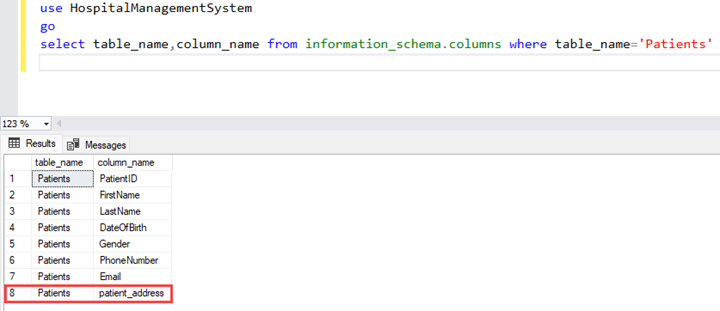
As you can see in the above image, the column Address has been changed to patient_address.

Let us take another example. Suppose you want to rename the column of Sales. invoice table which exists in the Wideworldimportors database. The current name of the column is InvoiceDate, and the new name will be InvoiceCreateDate. The query to rename the column is the following.
EXEC sys.sp_rename 'Sales.Invoices.InvoiceDate','InvoiceCreateDate','COLUMN'

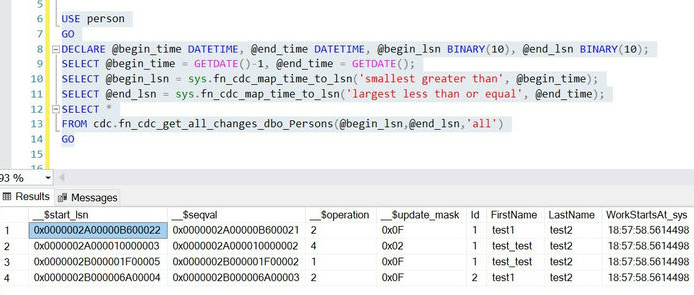
Here you can see, that we are changing the column name of the invoice table which is in the Sales schema. Therefore, we have used three-part naming. Once the column is renamed, execute the following T-SQL query to verify that the column has been renamed.
select table_name,column_name from information_schema.columns where table_name='Invoices'

Output
Renaming other objects in SQL Server
The sp_rename stored procedure can be used to rename other database objects, such as indexes, constraints, and stored procedures. The syntax of the sp_rename operation stays unchanged. The object_type argument for the sp_rename column will change. Let us consider a basic example.

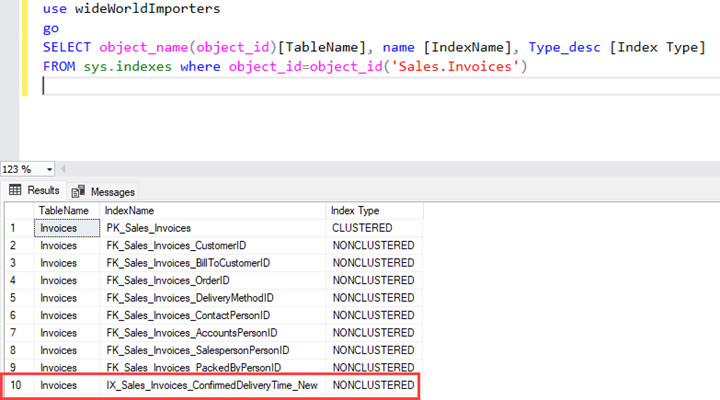
Assume we wish to rename the index of the sales invoice table. The index's present name is 'IX_Sales_Invoices_ConfirmedDeliveryTime', which we would like to modify to 'IX_Sales_Invoices_ConfirmedDeliveryTime_New'. In the query, the object_type argument in the sp_rename method will be set to INDEX. The query to rename the index is shown below.

EXEC sys.sp_rename 'Sales.Invoices.IX_Sales_Invoices_ConfirmedDeliveryTime','IX_Sales_Invoices_ConfirmedDeliveryTime_New','INDEX'

Once the index is renamed, you can query sys. indexes dynamic management view to verify that the index has been renamed successfully. Note that whenever we rename any index, the statistics associated with the index will be renamed as well. Here is the query to verify both changes.
SELECT object_name(object_id)[TableName], name [IndexName], Type_desc [Index Type]
FROM sys.indexes where object_id=object_id('Sales.Invoices')

Output
Using SQL Server Management Studio to Rename
We can use SQL Server Management Studio to rename the database object. In the first section, we learnt how to rename columns and indexes using the sp_rename stored procedure.

In this example, we'll see how to rename a constraint in SQL Server Management Studio. For demonstration, I'll rename the constraint in the Sales.invoice table. The present constraint name is DF_Sales_Invoices_InvoiceID, which we will rename to Default_Sales_Invoices_InvoiceID. As the name implies, this constraint is a default constraint.

First, launch SQL Server Management Studio and connect to your database server. Expand databases. Expand the Wideworldimportors database.
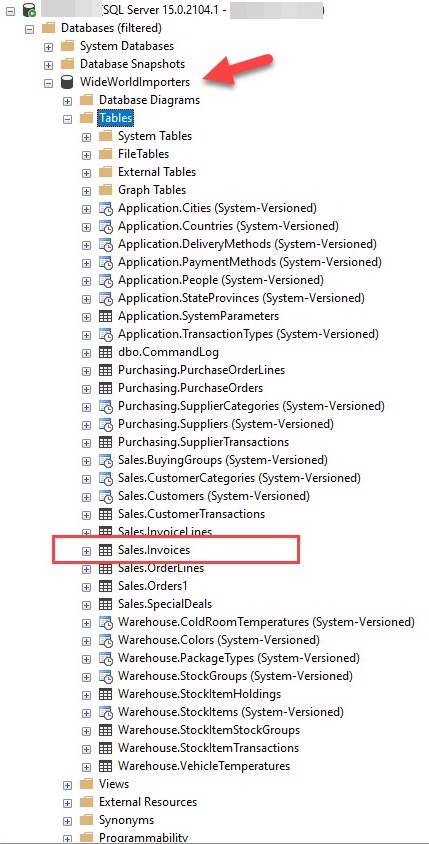
A database contains many tables. Expand the Sales, Invoice, and Constraint tables. Press F2 or right-click on DF_Sales_Invoices_InvoiceID and choose Rename.
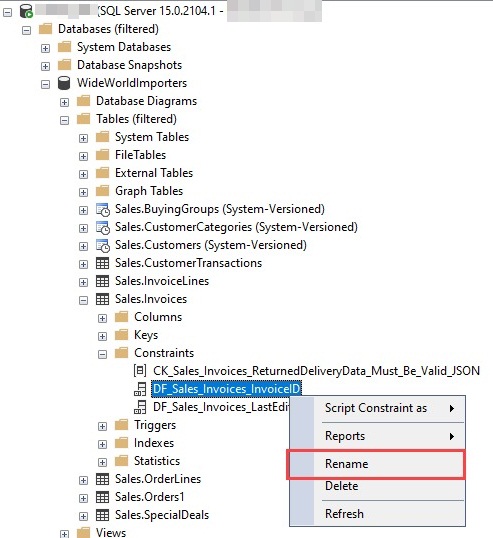
The name will be editable. Change the name to Default_Sales_Invoices_InvoiceID and hit enter. The name will be changed. The SQL Server management studio prompts a confirmation message that looks like the following image.
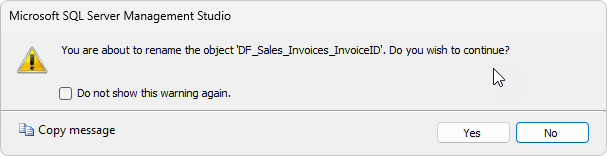
Click OK to change the name. Once changes are made, execute the following T-SQL query to verify that the constraint has been renamed successfully.
SELECT
  [constraint].name AS constraint_name,
  OBJECT_NAME([constraint].parent_object_id) AS table_name,
  [column].name AS column_name from
  sys.default_constraints [constraint]
JOIN
  sys.columns [column] ON [constraint].parent_object_id = [column].object_id
    AND [constraint].parent_column_id = [column].column_id
    where  OBJECT_NAME([constraint].parent_object_id)='Invoices'

Output
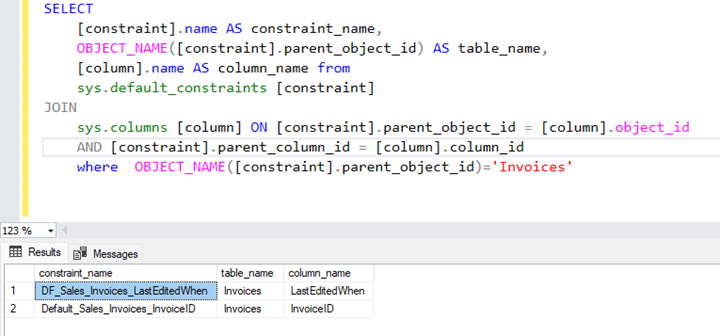
Let us take a look at some limitations and things to be considered before renaming any column.

Limitations and Considerations

If you are renaming any column in a table or renaming any object in a database, you must consider the following limitations and possible issues that might break the application.

  • ALTER permission is needed on the object that you want to rename. Suppose you want to rename a column name; you must have ALTER object permission on the table whose column you are renaming.
  • Renaming a column name always breaks the stored procedure or other objects (View, function, etc.) that are referencing that column. For example, you are renaming a column that is being used in a view. Therefore, make sure you modify all the stored procedures, functions, and triggers that reference the column that was renamed. You can use sys.sql_expression_dependencies to find all dependencies of the column.
  • When you rename a stored procedure, the object's name in sys.sql_modules will not change. Hence Microsoft recommends dropping and recreating an object instead of just renaming it.
  • When you rename a column of a table that is part of replication, the replication might break so if we want to rename the column of the replicated table, first, we must pause the replication, then rename the column using sp_rename or SQL Server management studio, update all database objects that are referencing the column, and finally, reinitialize replication with the new snapshot.

Conclusion
In this tutorial, we learned how to rename any column in a table. I demonstrated how to rename a column using a system-stored process called sp_rename, complete with syntax and easy examples. We also learned how to rename a column using SQL Server Management Studio. We can also use other tools, such as dbForge Studio for SQL Server, to run the stored procedure to rename a column. We also reviewed the limits and other difficulties that must be addressed before to renaming any object or column.

HostForLIFE.eu SQL Server 2022 Hosting
HostForLIFE.eu is European Windows Hosting Provider which focuses on Windows Platform only. We deliver on-demand hosting solutions including Shared hosting, Reseller Hosting, Cloud Hosting, Dedicated Servers, and IT as a Service for companies of all sizes.



About HostForLIFE.eu

HostForLIFE.eu is European Windows Hosting Provider which focuses on Windows Platform only. We deliver on-demand hosting solutions including Shared hosting, Reseller Hosting, Cloud Hosting, Dedicated Servers, and IT as a Service for companies of all sizes.

We have offered the latest Windows 2016 Hosting, ASP.NET Core 2.2.1 Hosting, ASP.NET MVC 6 Hosting and SQL 2017 Hosting.


Month List

Tag cloud

Sign in