SQL Server is a widespread database administration system utilized by organizations of all sizes. In order to effectively manage and maintain a database as a database administrator or developer, it is necessary to have a thorough understanding of SQL. This post will cover some useful SQL Server queries that will assist you in performing a variety of duties.
1. List all databases supported by SQL Server
To view an inventory of all databases on a server, use the query below.
SELECT name FROM sys.databases
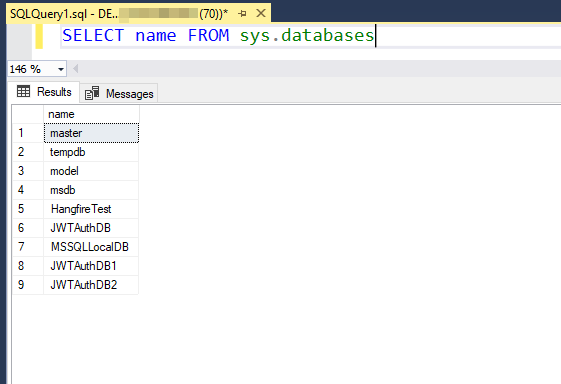
This will return a list of all databases on the server, including system databases such as 'master', 'model', and 'tempdb'.
2. Viewing the schema of a SQL table
To see the structure of a table, including column names and data types, you can use the following query:
EXEC sp_help 'table_name'

This will return a list of all columns in the table, along with information such as the data type, length, and whether or not the column is nullable.
3. Checking the size of a SQL Server database
To see the size of a database, including the amount of used and unused space, you can use the following query:
EXEC sp_spaceused
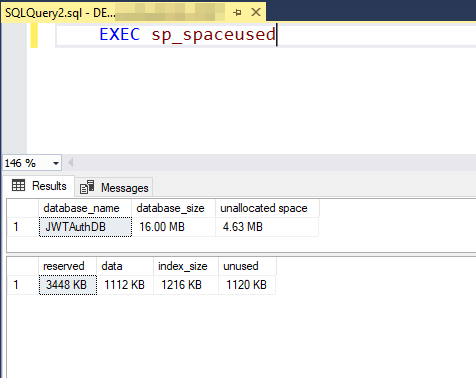
This will return the number of rows in the database, the amount of reserved space, and the amount of used and unused space.
4. Retrieving the current user
To see the current user that is connected to the database, you can use the following query:
SELECT SUSER_NAME()
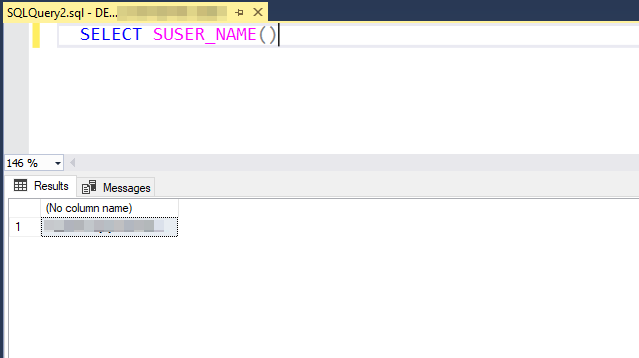
This can be useful for auditing purposes, or for determining which user is making changes to the database.
5. Viewing the current date and time
To see the current date and time on the server, you can use the following query:
SELECT GETDATE()
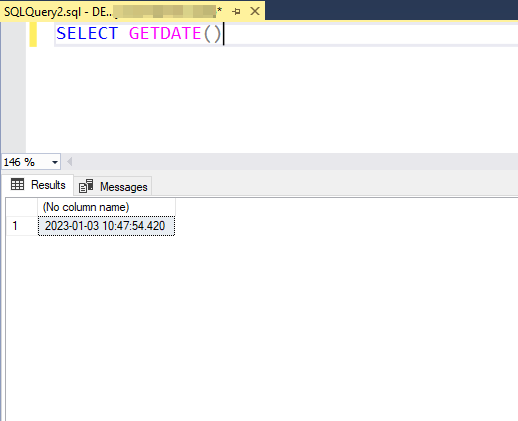
This can be useful for storing timestamps in your database, or for checking the current time on the server.
6. Finding the Total Space of the tables in a database
To see the total space of all the tables in a database, you can use the following query:
SELECT t.NAME
AS
TableName,
s.NAME
AS SchemaName,
p.rows,
Sum(a.total_pages) * 8
AS TotalSpaceKB,
Cast(Round(( ( Sum(a.total_pages) * 8 ) / 1024.00 ), 2) AS NUMERIC(36, 2)
) AS
TotalSpaceMB,
Sum(a.used_pages) * 8
AS UsedSpaceKB,
Cast(Round(( ( Sum(a.used_pages) * 8 ) / 1024.00 ), 2) AS NUMERIC(36, 2))
AS
UsedSpaceMB,
( Sum(a.total_pages) - Sum(a.used_pages) ) * 8
AS UnusedSpaceKB,
Cast(Round(( ( Sum(a.total_pages) - Sum(a.used_pages) ) * 8 ) / 1024.00,
2) AS
NUMERIC(36, 2))
AS UnusedSpaceMB
FROM sys.tables t
INNER JOIN sys.indexes i
ON t.object_id = i.object_id
INNER JOIN sys.partitions p
ON i.object_id = p.object_id
AND i.index_id = p.index_id
INNER JOIN sys.allocation_units a
ON p.partition_id = a.container_id
LEFT OUTER JOIN sys.schemas s
ON t.schema_id = s.schema_id
WHERE t.NAME NOT LIKE 'dt%'
AND t.is_ms_shipped = 0
AND i.object_id > 255
GROUP BY t.NAME,
s.NAME,
p.rows
ORDER BY totalspacemb DESC,
t.NAME
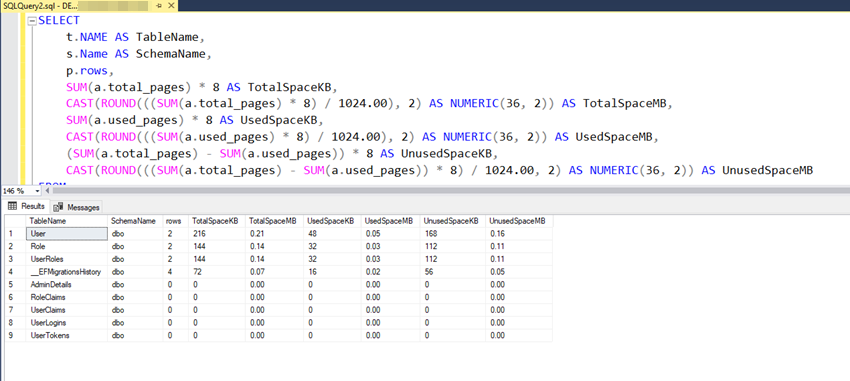
This can be useful for identifying tables that may be consuming a large amount of space, and determining if any optimization is necessary.
7. Connect two Database with Different Servers in SQL Server
To connect two databases on different servers in a SQL Server query, you can use a linked server. A linked server allows you to connect to another instance of an SQL Server and execute queries against it.
exec sp_addlinkedsrvlogin 'Servername', 'false', null, 'userid', 'password';
This can be connected to two databases.
8. Execute the query with the connected server database
To see the query where you use one server database for another server database, you can use the following query:
select * from [Servername].[Databasename].[dbo].[tablename]
This can be used from one server database to another database.
9. Disconnect two Database with Different Servers in SQL Server
To disconnect a linked server in SQL Server, you can use the sp_dropserver system stored procedure. Here's the syntax:
drop server exec sp_dropserver @server='Servername'
This can be disconnected from one server database to another database.
10. Top 20 Costliest Stored Procedures - High CPU
To see the query where you can find the SP which takes a High CPU, you can use the following query:
SELECT TOP (20)
p.name AS [SP Name],
qs.total_worker_time AS [TotalWorkerTime],
qs.total_worker_time/qs.execution_count AS [AvgWorkerTime],
qs.execution_count,
ISNULL(qs.execution_count/DATEDIFF(Second, qs.cached_time, GETDATE()), 0) AS [Calls/Second],
qs.total_elapsed_time,
qs.total_elapsed_time/qs.execution_count AS [avg_elapsed_time],
qs.cached_time
FROM sys.procedures AS p WITH (NOLOCK)
INNER JOIN sys.dm_exec_procedure_stats AS qs WITH (NOLOCK) ON p.[object_id] = qs.[object_id]
WHERE qs.database_id = DB_ID()
ORDER BY qs.total_worker_time DESC OPTION (RECOMPILE);
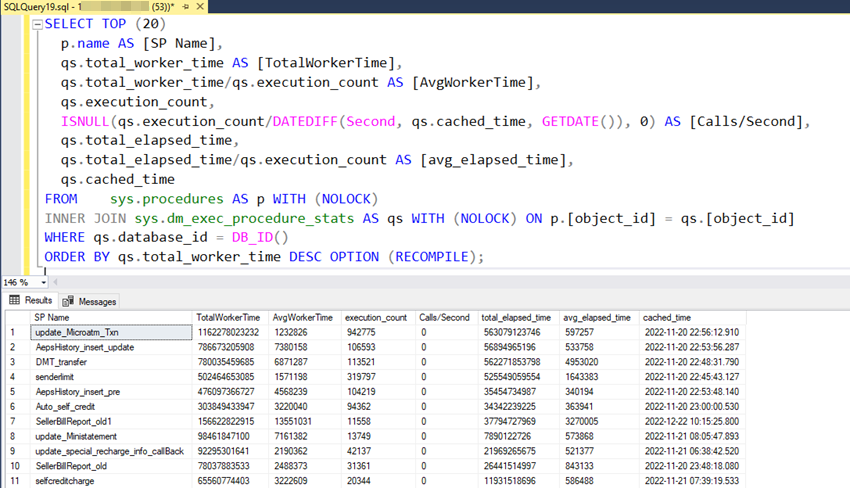
Output
SP Name: Stored Procedure Name
TotalWorkerTime: Total Worker Time since the last compile time
AvgWorkerTime: Average Worker Time since last compile time
execution_count: Total number of execution since last compile time
Calls/Second: Number of calls/executions per second
total_elapsed_time: total elapsed time
avg_elapsed_time: Average elapsed time
cached_time: Procedure Cached time
10. How to identify DUPLICATE indexes in SQL Server
To see the query where you can find duplicate indexes, you can use the following query:
;WITH myduplicate
AS (SELECT Sch.[name] AS
SchemaName
,
Obj.[name]
AS TableName,
Idx.[name] AS
IndexName,
Index_col(Sch.[name] + '.' + Obj.[name], Idx.index_id, 1) AS
Col1,
Index_col(Sch.[name] + '.' + Obj.[name], Idx.index_id, 2) AS
Col2,
Index_col(Sch.[name] + '.' + Obj.[name], Idx.index_id, 3) AS
Col3,
Index_col(Sch.[name] + '.' + Obj.[name], Idx.index_id, 4) AS
Col4,
Index_col(Sch.[name] + '.' + Obj.[name], Idx.index_id, 5) AS
Col5,
Index_col(Sch.[name] + '.' + Obj.[name], Idx.index_id, 6) AS
Col6,
Index_col(Sch.[name] + '.' + Obj.[name], Idx.index_id, 7) AS
Col7,
Index_col(Sch.[name] + '.' + Obj.[name], Idx.index_id, 8) AS
Col8,
Index_col(Sch.[name] + '.' + Obj.[name], Idx.index_id, 9) AS
Col9,
Index_col(Sch.[name] + '.' + Obj.[name], Idx.index_id, 10) AS
Col10,
Index_col(Sch.[name] + '.' + Obj.[name], Idx.index_id, 11) AS
Col11,
Index_col(Sch.[name] + '.' + Obj.[name], Idx.index_id, 12) AS
Col12,
Index_col(Sch.[name] + '.' + Obj.[name], Idx.index_id, 13) AS
Col13,
Index_col(Sch.[name] + '.' + Obj.[name], Idx.index_id, 14) AS
Col14,
Index_col(Sch.[name] + '.' + Obj.[name], Idx.index_id, 15) AS
Col15,
Index_col(Sch.[name] + '.' + Obj.[name], Idx.index_id, 16) AS
Col16
FROM sys.indexes Idx
INNER JOIN sys.objects Obj
ON Idx.[object_id] = Obj.[object_id]
INNER JOIN sys.schemas Sch
ON Sch.[schema_id] = Obj.[schema_id]
WHERE index_id > 0)
SELECT MD1.schemaname,
MD1.tablename,
MD1.indexname,
MD2.indexname AS OverLappingIndex,
MD1.col1,
MD1.col2,
MD1.col3,
MD1.col4,
MD1.col5,
MD1.col6,
MD1.col7,
MD1.col8,
MD1.col9,
MD1.col10,
MD1.col11,
MD1.col12,
MD1.col13,
MD1.col14,
MD1.col15,
MD1.col16
FROM myduplicate MD1
INNER JOIN myduplicate MD2
ON MD1.tablename = MD2.tablename
AND MD1.indexname <> MD2.indexname
AND MD1.col1 = MD2.col1
AND ( MD1.col2 IS NULL
OR MD2.col2 IS NULL
OR MD1.col2 = MD2.col2 )
AND ( MD1.col3 IS NULL
OR MD2.col3 IS NULL
OR MD1.col3 = MD2.col3 )
AND ( MD1.col4 IS NULL
OR MD2.col4 IS NULL
OR MD1.col4 = MD2.col4 )
AND ( MD1.col5 IS NULL
OR MD2.col5 IS NULL
OR MD1.col5 = MD2.col5 )
AND ( MD1.col6 IS NULL
OR MD2.col6 IS NULL
OR MD1.col6 = MD2.col6 )
AND ( MD1.col7 IS NULL
OR MD2.col7 IS NULL
OR MD1.col7 = MD2.col7 )
AND ( MD1.col8 IS NULL
OR MD2.col8 IS NULL
OR MD1.col8 = MD2.col8 )
AND ( MD1.col9 IS NULL
OR MD2.col9 IS NULL
OR MD1.col9 = MD2.col9 )
AND ( MD1.col10 IS NULL
OR MD2.col10 IS NULL
OR MD1.col10 = MD2.col10 )
AND ( MD1.col11 IS NULL
OR MD2.col11 IS NULL
OR MD1.col11 = MD2.col11 )
AND ( MD1.col12 IS NULL
OR MD2.col12 IS NULL
OR MD1.col12 = MD2.col12 )
AND ( MD1.col13 IS NULL
OR MD2.col13 IS NULL
OR MD1.col13 = MD2.col13 )
AND ( MD1.col14 IS NULL
OR MD2.col14 IS NULL
OR MD1.col14 = MD2.col14 )
AND ( MD1.col15 IS NULL
OR MD2.col15 IS NULL
OR MD1.col15 = MD2.col15 )
AND ( MD1.col16 IS NULL
OR MD2.col16 IS NULL
OR MD1.col16 = MD2.col16 )
ORDER BY MD1.schemaname,
MD1.tablename,
MD1.indexname
This can be Find the Duplicate Indexes, So you can remove the duplicate Indexes.
In this post, we covered some useful queries for working with Microsoft SQL Server. These queries can help you perform tasks such as listing all databases on a server, viewing the schema of a table, checking the size of a database, seeing the current user and date and time, linking to another server database, get Duplicate indexes.
I hope these queries are useful for you!
HostForLIFE.eu SQL Server 2019 Hosting
HostForLIFE.eu is European Windows Hosting Provider which focuses on Windows Platform only. We deliver on-demand hosting solutions including Shared hosting, Reseller Hosting, Cloud Hosting, Dedicated Servers, and IT as a Service for companies of all sizes.